


 Gear4Music
 Andertons
 Music Store
 zZounds
 Plugin Boutique
If your stream is built on Elgato's ecosystem or you want a wall of instantly visible keys plus real dials, the Elgato Stream Deck + XL wins. Thirty-six physical LCD keys and six tactile dials with the deepest plugin library in the industry make it the more powerful, more expandable desk. If you edit video and photos as much as you stream, want to save money, and do not mind touch keys, the Razer Stream Controller is the value pick. Its built-in Adobe Creative Suite support is unique at this price, and it is frequently discounted well below list.
Elgato Stream Deck + XL vs Razer Stream Controller: Which Stream Deck Is Better?

The Elgato Stream Deck + XL and the Razer Stream Controller are the two heavyweight button panels for streamers and creators, but they play the game very differently. One gives you 36 physical LCD keys plus six dials in the deepest plugin ecosystem on the market; the other puts 12 haptic touch keys on a Loupedeck base with built-in Adobe Creative Suite support. I have run both through OBS-heavy streams, editing sessions and live shows to find out which deck actually earns its spot under your fingers.
Verdict
The Elgato Stream Deck + XL is for expandability and physical keys that feel great under your thumb. The Razer Stream Controller is the price pick with Adobe integration for video editors. More keys vs better software value — pick what fits your workflow.
Elgato Stream Deck + XL
Pros
- 36 LCD keys put your whole production on one page
- Six tactile dials mix audio and mutes with a push
- Touch strip adds a scrubber-style control surface
- Deepest plugin ecosystem in the industry
- USB-C with adjustable magnetic stand
Cons
- It is a lot if you will not actually use 36 keys
- Controls software — it does not mix audio or process your mic
- Still new, so the review count is low
- Replacing a failed LCD key requires a full unit repair rather than a user-swappable part
- The touch strip only does what plugins implement — many apps ignore it entirely
Razer Stream Controller
Pros
- Built-in Adobe Creative Suite support — unique at this price
- 12 haptic Switchblade keys double as mini LCD screens
- Dynamic Mode auto-swaps layouts per app
- Frequently discounted well below the list price
- Mature Loupedeck software ships with ready-made profiles
Cons
- Touch keys lack the physical blind-triggering feel of real buttons
- Setup is more fiddly than Elgato's app
- Haptic feedback is weak — you often rely on the screens
- The two side LCD panels show static labels rather than per-key dynamic graphics
- The plugin library is smaller than Elgato's, so some apps need manual key mapping
How Do They Compare?
| Elgato Stream Deck + XL | Razer Stream Controller | |
|---|---|---|
| Best For | Streamers in the Elgato/OBS ecosystem | Creators who stream and edit Adobe |
| Keys | 36 physical LCD keys (8x4) | 12 haptic Switchblade touch keys |
| Dials | 6 tactile encoders with push | 6 tactile analog dials with push |
| Extra Controls | Touch strip + adjustable magnetic stand | 8 programmable buttons + 2 side LCD panels |
| Software | Elgato ecosystem — hundreds of plugins | Loupedeck with Adobe Suite support |
| Auto Layouts | Smart Profiles per app | Dynamic Mode auto-swaps per app |
| Connectivity | USB-C 3.0 | 2m USB-A to USB-C cable |
| OS | Windows 11 / macOS 13+ | Windows 10+ / macOS 10.14+ |
The Quick Answer: Stream Deck + XL vs Razer Stream Controller
Why the Elgato Stream Deck + XL Is the Power Pick
The Stream Deck + XL gives you 36 fully customizable LCD keys in an 8x4 grid, a row of six tactile dials and a touch strip — your whole production fits on one page with nothing buried in folders. The dials work as 360-degree encoders with a push action for mutes or toggles, the touch strip adds a scrubber-style control surface, and everything runs through the same deep plugin ecosystem as the rest of the Stream Deck line: OBS, Twitch, Discord, Spotify, smart home, and Wave Link turn the dials into an actual audio surface. It connects over USB-C and runs on Windows 11 and macOS 13 or newer. It is new, so User reviews are still thin (4.8/5 across 61 at the moment), but the hardware speaks for itself.
Why the Razer Stream Controller Is the Value Pick
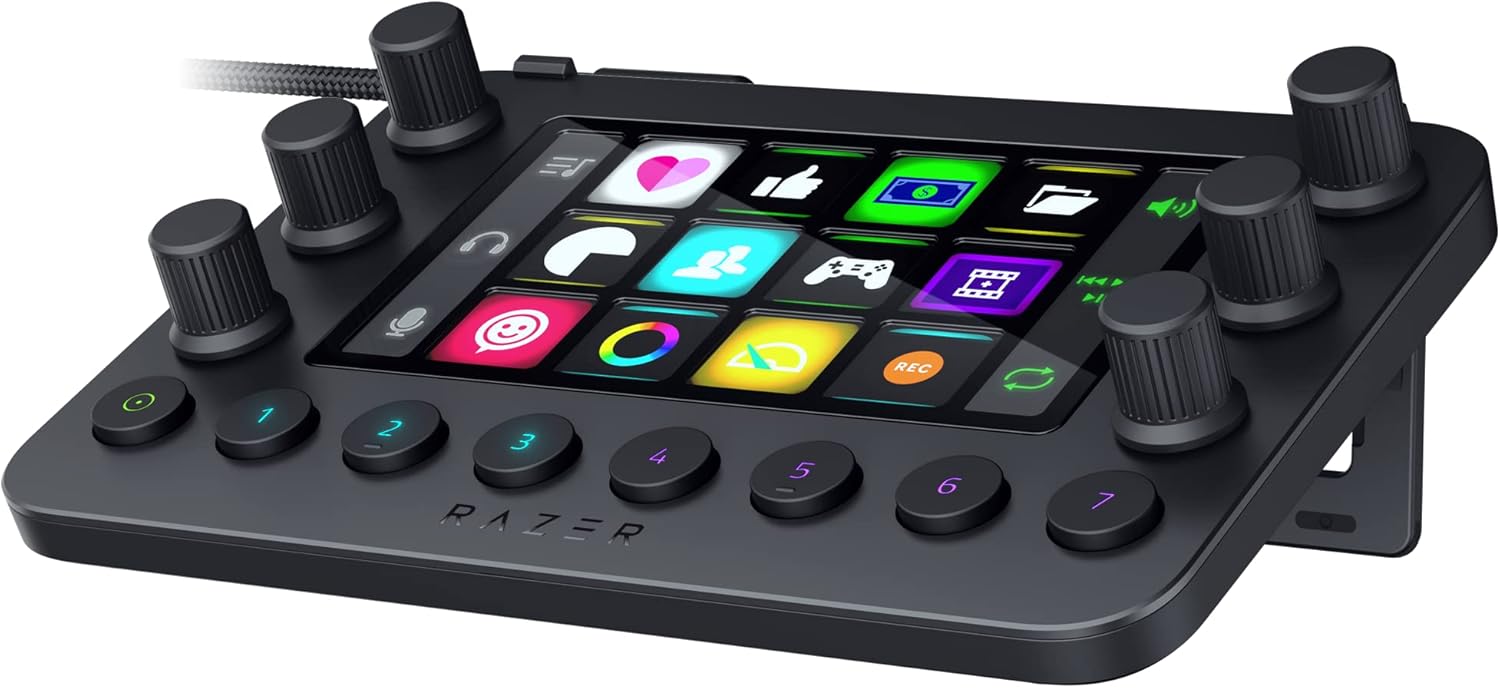
The Razer Stream Controller is a Loupedeck Live reborn. Twelve haptic Switchblade keys that double as mini LCD touchscreens, six tactile analog dials that click in as buttons, eight programmable keys and two side LCD panels for dial info. Setup runs through Loupedeck software with ready-made profiles, and the big differentiator is out-of-the-box support for the Adobe Creative Suite — Lightroom Classic, Photoshop, Premiere Pro, After Effects, Illustrator and Final Cut Pro — plus OBS, Streamlabs, Twitch, Discord and Spotify. Dynamic Mode auto-swaps your layout based on the app you are in. It has 413 user reviews at 4.2/5, and it is frequently discounted well below the list price.
The Verdict: Physical Keys vs Adobe Control
If your stream is built on Elgato's ecosystem or you want a wall of instantly visible keys plus real dials, the Stream Deck + XL is the more powerful, more expandable desk. The plugin ecosystem is the deepest in the industry, and physical keys are easier to hit blind while you are talking. If you edit video and photos as much as you stream, want to save money, and do not mind touch keys instead of physical ones, the Razer Stream Controller gets you the Adobe controls nothing else here offers. No wrong answer — pick the deck that matches how you actually work.
⚠️ Attention:Prices may vary depending on your location; your final total is confirmed in your local currency at checkout. Each store applies its own shipping policy: some offer completely free shipping, others charge a shipping fee, and others provide free shipping above a minimum order amount. Additionally, some stores only ship within the U.S.
Conclusion
The Elgato Stream Deck + XL is the more powerful, ecosystem-rich desk for streamers who want 36 physical keys and six dials in the deepest plugin library on the market. The Razer Stream Controller is the value pick with unique Adobe Creative Suite support, and it is frequently discounted well below list.
Looking for more? Check our RØDECaster Pro II vs Mackie DLZ Creator battle, the best stream controllers and mixers guide, and the best streaming interfaces.
Frequently Asked Questions
What Products Are in This Guide?
Razer Stream Controller
The Razer Stream Controller is Razer's take on the Loupedeck Live formula: 12 haptic Switchblade keys that double as mini LCD touchscreens, six tactile analog dials that click in as buttons, eight programmable keys and two side LCD panels for dial info. It's an all-in-one keypad for streaming and content creation with integrated support for OBS Studio, Streamlabs, Twitch, Discord, Spotify and the Adobe Creative Suite, plus Dynamic Mode that swaps layouts automatically based on the app you're in. Setup runs through Loupedeck software with ready-made profiles, and it works on PC and Mac over a 2-meter USB-C cable.
Elgato Stream Deck + XL
The Stream Deck + XL is Elgato's biggest controller yet: 36 fully customizable LCD keys plus a row of six tactile dials and a touch strip, so you get scenes, audio mixing, camera cuts and instant effects on one desk. The dials work as 360-degree encoders with a push action for mutes or toggles, the touch strip gives you a scrubber-style control surface, and everything runs through the same deep plugin ecosystem as the rest of the Stream Deck line. It connects over USB-C, works with Windows and macOS, and its adjustable magnetic stand keeps the whole thing at the right angle.
Reviews
(0 reviews)
Cuban Tres, Bass & Guitar - played and recorded with my personal gear